

Abstract
In this case study, I show how a messy human workflow can be turned into an AI-assisted automated system. Instead of starting from tools, the system is designed by first discovering the shape and components of the human process, and only then mapping it into an automated pipeline. Using expense receipts as the example, I argue that the real challenge is not just the manual, time-consuming work, but dealing with ambiguity, partial information, and state and that a process-first approach leads to an architecture where tools play clear, limited roles instead of becoming the design.
The Real-World Process Nobody Wants to Automate
Before any software existed, the process was entirely manual. Employees would drop their receipts on the finance administrator’s desk throughout the month. At month end, the administrator would take this pile of paper and manually capture each slip into an Excel spreadsheet. This step was both time-consuming and error-prone because of the possibility of mistyped amounts, duplicate entries, and receipts being assigned to the wrong employee.
Once the spreadsheet was “done”, it was emailed to the bookkeeper, who would then manually capture the same information again into the accounting system. At no point was there a real system of record, only copies of copies, maintained by hand. The process worked, but only in the way many manual processes work, through repetition, patience, and a steady acceptance of small, persistent errors.
Finding the Shape of the Workflow
Once the problem is stated in terms of a process instead of a task, its structure becomes surprisingly clear. What exists is not a single operation, but a sequence of transformations that take something unstructured and gradually turn it into something that can be trusted.
First, new material must be ingested into the system. This is not yet processing, but simply acknowledging that new information exists. Next, the system must be able to tell what is new and what has already been seen, otherwise duplication becomes unavoidable. Only after that does extraction make sense, which is the act of turning an image or document into structured meaning.
But extraction alone is not enough. The result still needs to be normalized, validated, and made comparable with everything else that already exists. Finally, the outcome has to be persisted somewhere, and the system must remember what has already happened. In other words, the process is inherently stateful. It has stages, transitions, and memory.
What matters here is that this is not yet an implementation. This is the process model. It describes what must happen, and in what order, without saying anything about how or with which tools. Once this shape is clear, the software architecture almost designs itself.
The Architecture That Emerged
Once the shape of the workflow was clear, the actual system almost assembled itself around it. The final result was not a single script or a single workflow, but three distinct pipelines, each responsible for a different phase of the process. n8n is used as the orchestrator for all three, not because it defines the architecture, but because it is well suited to coordinate stateful workflows.
The first workflow is responsible for ingestion and discovery. Google Drive acts as a shared inbox where receipt images appear. This workflow periodically scans that folder, compares it against what is already known, and registers any new files in a Google Sheets document that serves as a ledger and state store. At this point, nothing is interpreted or understood. The system merely acknowledges that new material exists and marks it as new.
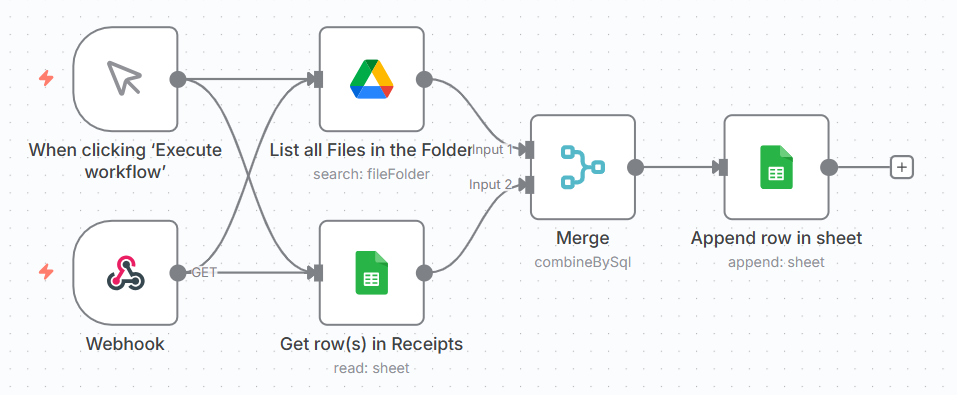
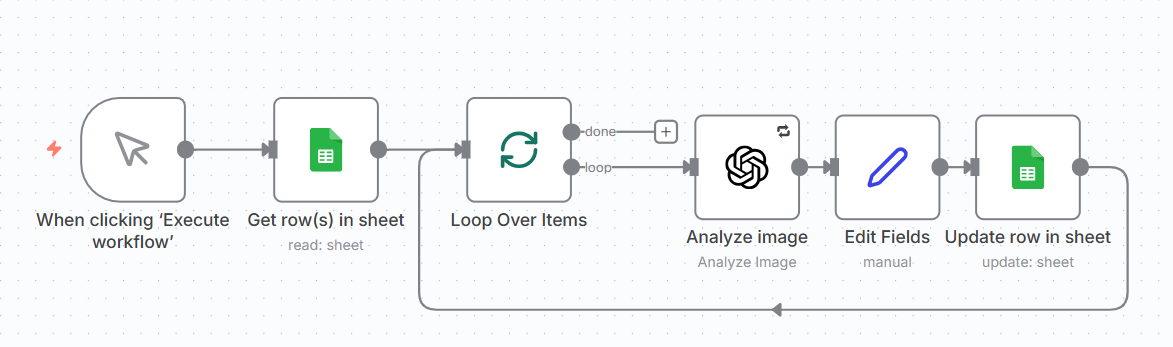
The second workflow is responsible for extraction. It looks only at entries in the ledger that are in the “new” state, loads the corresponding images from Drive, and sends them to ChatGPT to perform semantic extraction. The result is not yet treated as final data. It is stored back in the sheet as an intermediate representation, and the state of each item is advanced to reflect that this step has been completed.
The third workflow is responsible for refinement and normalization. It takes items that have already been extracted, cleans up the data, normalizes formats, resolves special cases, and finally appends the result to the final, structured dataset. At this point, the receipt stops being an image in a folder and becomes an accounting entry.
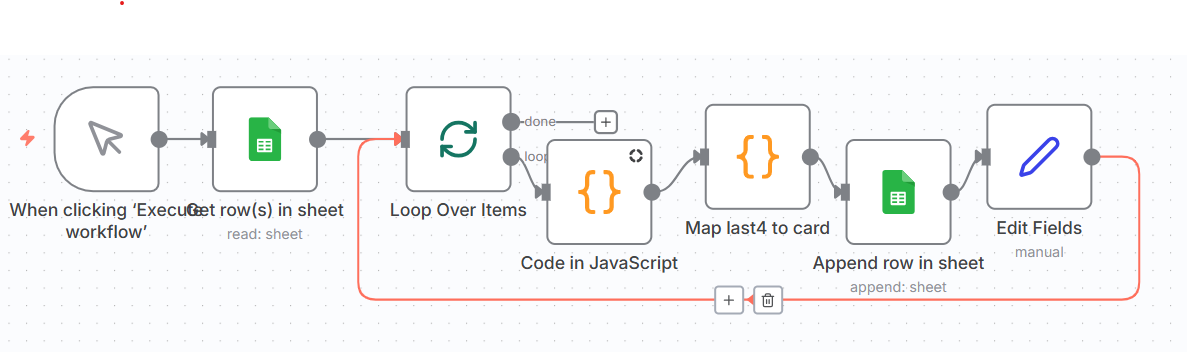
What connects these three workflows is not direct control flow, but state. Google Sheets plays the role of a very simple state machine. Each workflow only processes items that are in the appropriate state and advances them to the next one. This makes the system a true pipeline. Each stage is independent, repeatable, and restartable.
This is also why the result is not just a collection of scripts glued together. Each tool has a narrow, well-defined responsibility. n8n orchestrates, Google Drive holds incoming material, Google Sheets tracks state and progress, and ChatGPT provides semantic interpretation. The structure of the system mirrors the structure of the process it automates.
What This Buys You
The most obvious benefit of the system is that it produces a digital record by default. Every receipt becomes a durable, linkable, and searchable entry. The original image is never lost, and every extracted value can always be traced back to its source. This alone changes the nature of the process from a transient, paper-based workflow into something that can be inspected, audited, and reasoned about.
A second, more subtle benefit is that uncertainty becomes explicit. When ChatGPT is not confident about a field, that uncertainty is recorded instead of being silently turned into a wrong value. This makes it possible to treat automation not as a blind replacement for human work, but as a filter that handles the obvious cases and highlights the ambiguous ones for manual inspection.
The result is not a system that pretends to be perfectly accurate, but one that is designed to be correctable. Humans are no longer responsible for retyping everything. They are responsible only for reviewing the small fraction of cases that are genuinely unclear. This is a much better use of attention, and it is only possible because the system keeps a proper record of both the data and its provenance.
Where This Can Go Next
Now that the process has a clear shape, extending it becomes straightforward. The most obvious next step is to integrate directly with the accounting system’s API and turn the final stage of the pipeline into an automated posting step, instead of a manual one.
Another natural extension is to move ingestion closer to the source. A simple mobile application could allow employees to capture receipts in real time, with basic quality checks to avoid unreadable images or incomplete submissions.
What matters is that these are not architectural changes. They are refinements of the same pipeline. The shape stays the same. Only the endpoints improve.
Conclusion: Software Is a Frozen Process
In this case study, the most important design decision was not a technical one. It was the decision to treat the existing workflow as something to be understood, not something to be bulldozed and replaced. Once the shape of the work was made explicit, the software architecture followed naturally.
What this system really does is not “process receipts”. It freezes a human process into code. It captures its stages, its transitions, its uncertainties, and its failure modes, and makes them visible and repeatable. The tools themselves are secondary. They matter only insofar as they serve this shape.
Good automation is not about replacing humans. It is about respecting the shape of the work they were already doing, and then building software that can carry that shape more reliably, more consistently, and with far less wasted attention.